
Cart
0

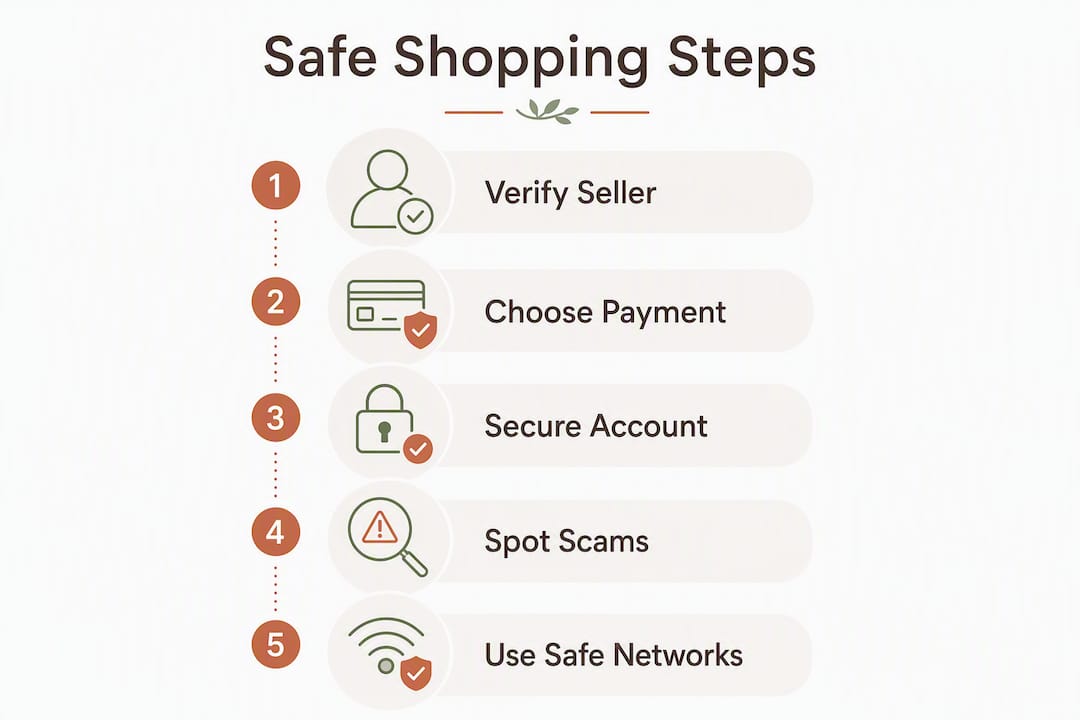
Before you buy anything online, run through this short checklist: verify the seller, pay by credit card or a recognised digital wallet, lock your accounts with unique passwords and two-step verification, use a secure device on a trusted network, and know exactly what to do if something goes wrong. These five habits cover the vast majority of online fraud risks UK shoppers face.
- Check the seller — look for a phone number, physical address, and independent reviews before you hand over any money.
- Pay by credit card or digital wallet — both give you dispute rights that bank transfers simply do not.
- Use unique passwords and two-step verification — the NCSC recommends 2SV on every account that holds payment details or personal data.
- Stay on a trusted network — avoid public Wi-Fi at checkout; use mobile data or your home broadband instead.
- Act fast if something goes wrong — contact your card issuer, keep all evidence, and report fraud to Action Fraud.
Pro Tip: Before a high-value purchase from a new seller, spend two minutes searching the company name plus “reviews” and “scam” in the same search. What comes up in the first page tells you almost everything you need to know.
Table of Contents
- How do you check a shop or seller is legitimate?
- What are the safest payment methods for UK shoppers?
- How do you keep your shopping accounts and passwords secure?
- How do you spot scams and red flags before and after a purchase?
- What device and network habits protect you at checkout?
- What should you do if something goes wrong after a purchase?
- Your printable secure-shopping checklist
- Key takeaways
- A note from Homable on safe shopping
- Useful sources and where to get help
How do you check a shop or seller is legitimate?
The most reliable signal of a trustworthy seller is not a padlock icon—it is a consistent, verifiable identity. Start with the basics: does the site show a working telephone number, a physical address, and a named company? Cross-reference that company name against Companies House (free to search at gov.uk) to confirm it is a registered UK business.
Next, look for independent reviews on third-party platforms such as Trustpilot or Google Reviews, not just the testimonials the retailer has curated on its own site. A genuine trading history shows reviews spread across months or years, with a mix of positive and critical feedback. A page of five-star reviews all posted in the same week is a red flag.
Inspect the domain carefully:
- Lookalike domains — scammers register addresses like “amaz0n-deals.co.uk” or add hyphens and extra words to mimic trusted brands.
- Recent registration — a domain registered days or weeks before you found it via an advert deserves extra scrutiny; use a free WHOIS lookup to check.
- Mismatched branding — blurry logos, inconsistent fonts, and copy that reads as if it was machine-translated all suggest a hastily built fake.
- Missing or vague policies — a legitimate retailer publishes clear delivery, returns, and privacy policies. If those pages are absent or filled with placeholder text, walk away.
When in doubt, the Stop Think Fraud campaign run by the UK government offers practical guidance on verifying sellers and spotting fraudulent sites before you commit.
What are the safest payment methods for UK shoppers?
Credit cards are the strongest choice for online purchases in the UK. Under Section 75 of the Consumer Credit Act, you have a legal claim against your card issuer for eligible purchases within a regulated price range if the goods are not delivered or the seller goes bust. For smaller purchases, the chargeback scheme may apply through your card network as a voluntary protection.

The NCSC advises using a credit card specifically for online shopping and avoiding direct bank transfers to unknown sellers. Once money leaves your account via a bank transfer, recovering it is extremely difficult, and there is no equivalent of the chargeback process to fall back on.
Digital wallets such as PayPal, Apple Pay, and Google Pay add a useful layer of protection when buying from smaller or unfamiliar retailers. They process the payment without exposing your actual card number to the merchant’s systems, so even if that retailer suffers a data breach, your card details are not in their database.
Statistic callout: The FTC notes that if a seller does not state a shipping time, they must dispatch within 30 days of taking payment. Keep a screenshot of any delivery promise — it becomes your evidence if you need to dispute the charge.
A few practical steps to limit your exposure further:
- Virtual cards — some UK banks and services let you generate a single-use or low-limit virtual card number for online use; if it is compromised, cancelling it does not affect your main account.
- A dedicated low-limit card — keeping a separate card solely for online shopping caps the damage if details are stolen.
- Guest checkout — use it wherever available so the retailer never stores your card details on their servers.
Pro Tip: If a site asks you to pay by gift card, wire transfer, or cryptocurrency, stop immediately. No legitimate UK retailer uses those methods for standard purchases.
How do you keep your shopping accounts and passwords secure?
Every account you use for online shopping — your email, retailer accounts, and payment services — needs a unique password. Reusing the same password across sites is the single most exploitable habit: one breach at a small retailer can hand attackers the keys to your email or your bank.
A reputable password manager such as Bitwarden, 1Password, or the built-in manager in iOS or Android removes the memory burden entirely. It generates long, random passwords and fills them in automatically, so you never need to type “Fluffy2019!” into a checkout form again.
Steps to harden your accounts:
- Create a unique password for every site — at least 12 characters, mixing letters, numbers, and symbols. Let your password manager generate it.
- Enable two-step verification (2SV) on your email account first, then on payment services and retailer accounts. An authenticator app such as Google Authenticator or Microsoft Authenticator is more secure than SMS codes, though SMS is still far better than nothing.
- Audit saved passwords — most password managers flag reused or compromised credentials. Run the check and update anything flagged.
- Do not let your browser save card details unless you are confident the device is secure and used only by you.
- Change passwords immediately if you receive a breach notification, or if you suspect an account has been accessed without your knowledge.
The NCSC’s guidance on two-step verification is clear: 2SV confirms your identity via a second method even if your password is stolen, making credential-stuffing attacks far less effective.
How do you spot scams and red flags before and after a purchase?
The most reliable warning sign is price. If a deal looks too good to be true — a £400 appliance listed at £60 from a seller you have never heard of — it almost certainly is. Scammers know that urgency and excitement override caution, which is why fake adverts on social media often use countdown timers and “limited stock” pressure.
Other red flags to watch for on a site or in a message:
- No secure connection on a payment page — though note the NCSC’s important caveat: HTTPS alone does not prove a site is legitimate. Criminals can and do use encryption on fraudulent sites. A padlock confirms the connection is encrypted; it says nothing about who owns the site.
Post-purchase scams deserve particular attention. Fake parcel-tracking messages are one of the most common tactics: you receive a text or email claiming your delivery has a problem, with a link to “reschedule” or pay a small fee. Always check tracking via the retailer’s official website or the courier’s own app — never through a link in an unsolicited message.
Pro Tip: Type a retailer’s web address manually into your browser rather than clicking a link in an email or advert. This one habit defeats typosquatting, where scammers register near-identical domains to intercept shoppers.
What device and network habits protect you at checkout?
Keeping your operating system, browser, and apps up to date is the single most effective technical defence against malware. Software updates patch the vulnerabilities attackers actively exploit; delaying them is the digital equivalent of leaving a window open.
Public Wi-Fi is a genuine risk at checkout. Networks in cafés, airports, and hotels are often unencrypted, meaning someone on the same network can potentially intercept data. Use mobile data or your home broadband for any transaction involving payment details. If you must use public Wi-Fi, a reputable VPN encrypts your traffic before it leaves your device.
A few browser habits worth building:
- Check that the address bar shows the correct domain before entering any details — not just a padlock, but the actual URL.
- Disable browser autofill for payment card fields; autofill can populate details into forms you did not intend to fill.
- Only install apps from official stores (the App Store or Google Play), and be cautious about browser extensions that request access to payment pages.
The Australian Cyber Security Centre echoes NCSC guidance on this point: keep devices updated, use trusted networks, and prefer reputable sellers. The advice is consistent across every major national cyber agency because the underlying risks are the same everywhere.
What should you do if something goes wrong after a purchase?
Act quickly. The sooner you contact your card issuer, the better your chances of a successful chargeback. Most card networks have time limits on disputes, and delay weakens your case.
Step-by-step:
- Contact the seller first — keep a written record of every message. Many disputes are resolved here, and evidence of your attempt to resolve it directly strengthens any later claim.
- Gather your evidence — screenshots of the product listing, order confirmation, delivery promise, and any communications with the seller.
- Contact your card issuer — ask specifically about a chargeback or, for credit card purchases over £100, a Section 75 claim. Have your evidence ready.
- Report to Action Fraud at actionfraud.police.uk or by calling 0300 123 2040. Action Fraud is the UK’s national reporting centre for fraud and cybercrime.
- Contact Citizens Advice — their consumer helpline can advise on your legal rights, particularly around the Consumer Rights Act and distance-selling regulations.
A few additional points:
- If you believe your card details have been stolen, cancel the card immediately through your bank’s app or helpline.
- For disputes involving non-delivery, the FTC’s guidance on shipping timelines is a useful reference for understanding what sellers are obligated to do, even though it applies to US law — UK consumer rights under the Consumer Rights Act 2015 are broadly comparable.
- Keep all records for at least six months after a dispute is resolved.
Pro Tip: Screenshot the product listing page before you buy, not after. Sellers sometimes alter or remove listings once a dispute begins, and your screenshot becomes your primary evidence of what was promised.
Your printable secure-shopping checklist
Save or print this before any purchase, especially from a new or unfamiliar seller.
Before you buy:
- [ ] Verified the seller’s contact details (phone, address, company registration).
- [ ] Checked independent reviews on a third-party platform.
- [ ] Inspected the domain for lookalike spelling or recent registration.
- [ ] Confirmed clear delivery, returns, and privacy policies exist.
- [ ] Chosen to pay by credit card or a recognised digital wallet.
- [ ] Screenshotted the product listing and delivery promise.
At checkout:
- [ ] Confirmed the URL is correct and matches the retailer’s official domain.
- [ ] Used guest checkout or declined to save card details.
- [ ] Connected via home broadband or mobile data, not public Wi-Fi.
Account security:
- [ ] Using a unique password for this retailer’s account.
- [ ] Two-step verification enabled on email and payment accounts.
After purchase:
- [ ] Saved the order confirmation and receipt.
- [ ] Tracking orders only via the retailer’s official site or app.
- [ ] Ready to contact the card issuer and Action Fraud if needed.
Pro Tip: For purchases over £100 or from a seller you have never used before, run through every item on this list rather than skipping the quick ones. The checks that feel unnecessary are usually the ones that matter most.
Key takeaways
Paying by credit card and enabling two-step verification on your accounts are the two actions that reduce online shopping fraud risk the most for UK shoppers.
| Point | Details |
|---|---|
| Verify the seller first | Check contact details, company registration, and independent reviews before paying. |
| Credit card is your strongest protection | Section 75 of the Consumer Credit Act covers purchases over £100. |
| Unique passwords and 2SV | Use a password manager and enable two-step verification on every account holding payment data. |
| Avoid public Wi-Fi at checkout | Use home broadband or mobile data; a VPN adds protection if public Wi-Fi is unavoidable. |
| Act fast if fraud occurs | Contact your card issuer, report to Action Fraud, and keep all evidence for at least six months. |
A note from Homable on safe shopping
At Homable, we think about online shopping safety not as a technical problem but as a matter of trust. Every order placed on Homable.co.uk goes through a secure checkout, and we offer free shipping on orders over £100 so there are no surprise fees at the final step. If you ever have a question about an order or need help with a purchase, our contact details are clearly listed on the site.
We published this guide because home-decor shoppers are not immune to the scams that target every online buyer. Whether you are buying a decorative silver flower candle holder from us or browsing elsewhere, the same principles apply: verify, protect your payment, and keep your records. Safe shopping is good shopping.

Useful sources and where to get help
- NCSC — Shopping and paying safely online: The UK’s National Cyber Security Centre guidance on safe online purchases, covering payments, passwords, and spotting scams.
- Stop Think Fraud — UK Government campaign: Official UK government advice on recognising and avoiding online fraud.
- Action Fraud — actionfraud.police.uk or 0300 123 2040: — The national reporting centre for fraud and cybercrime in England, Wales, and Northern Ireland.
- Homable — secure home-decor shopping: Browse Homable’s curated range with secure checkout, clear policies, and free shipping over £100.
This article provides general information about online shopping safety and is not legal or financial advice. For disputes, confirm your rights with Citizens Advice or a qualified professional.